Good security testing starts with one question: what is this application actually doing? Not what its documentation claims, not what its developers intended, but what is genuinely moving across the wire when a real user interacts with it. For most web applications, that question has a tractable answer. For applications built on Blazor Server, a dedicated decoder has historically been required, and until now, no such decoder existed for ZAP.
Crimson Wall has conducted penetration tests since 2018 across web applications, AI systems, enterprise networks, and hardware devices. Where the available tooling has fallen short, the team has built its own. The Crimson Blazor Decoder is the first of those tools to be released publicly, published on GitHub under the Apache Licence, Version 2.0, and made available to anyone who needs it.
What Blazor Server Actually Is
Blazor is a web framework from Microsoft that lets developers write interactive browser interfaces in C# rather than JavaScript. That is notable in itself, but the more interesting detail, from a security perspective, is how Blazor Server delivers those interfaces to the browser.
In the Blazor Server hosting model, no C# application code runs in the browser. Instead, a client is downloaded to the browser to facilitate interactions with the server over a persistent WebSocket connection. Every subsequent interaction, whether a button click, a form change, or a navigation event, travels from the browser to the server, is processed there, and the resulting change to the Document Object Model (DOM) is pushed back as an update. Microsoft's documentation describes the server-side state for each connected user as a circuit: a stateful, server-resident object that holds the complete component state for that session.
The result is that application behaviour, state changes, every data exposure, and every server-side decision travel to the browser as binary-encoded Blazor Pack messages over a WebSocket connection that requires a purpose-built decoder to read.
The Binary Wall: Blazor Pack and MessagePack
When a Blazor Server application sends a UI update to the browser, it does not send JSON or an HTML fragment. It sends a binary message in the Blazor Pack format. Blazor Pack is Microsoft's implementation of the SignalR Hub Protocol, using MessagePack as its underlying serialisation layer within its own structural framing. MessagePack is a binary serialisation format designed to be faster and smaller than JavaScript Object Notation (JSON).
There is a further layer to the encoding. Each Blazor Pack message is length-prefixed using a Protocol Buffers variable-length integer, called a varint, that tells the receiver how many bytes to consume before the next message begins. Once the WebSocket connection is open, the client sends a JSON handshake frame specifying the Hub Protocol it wishes to use, and the server acknowledges it. After that exchange, every application message is Blazor Pack binary, and developers cannot change that. Although SignalR supports both JSON and MessagePack for custom hubs, the Blazor hub at /_blazor registers BlazorPackHubProtocol specifically, and the Blazor client-side JavaScript requests it by name. There is no supported configuration path that switches the application traffic to plain text.
These framed binary messages are sent within WebSocket frames over a SignalR connection. A proxy tool like the Zed Attack Proxy (ZAP), originally developed as an Open Web Application Security Project (OWASP) project and now maintained by Checkmarx under the Linux Foundation, captures these frames without difficulty. What the tester sees in the WebSocket tab is a stream of hexadecimal byte sequences. The situation is made worse by the fact that Blazor Pack is not plain MessagePack. It follows Blazor's own Hub Protocol specification, which means generic MessagePack parser extensions fail on it too, typically reading only the first byte before halting. A render batch carrying DOM update instructions is therefore indistinguishable from a JavaScript interoperability call or a circuit close notification. They are all, without a Blazor Pack decoder, the same wall of bytes.
What This Means for a Penetration Test
Penetration testing a web application depends on being able to read what the application is doing. For applications built on conventional REST Application Programming Interfaces (APIs), that traffic is JSON or XML. It appears in any proxy tool the moment it is captured, and a tester can work with it immediately. Blazor Server offers no such transparency out of the box. The entire communication channel between the browser and server, covering every state update, every data value and every server-side call, is hidden inside binary frames that require a Blazor Pack-aware decoder to interpret.
Decoders for Burp Suite exist: Aon CyberLabs published the BlazorTrafficProcessor extension in 2023, and SensePost published research the same year on decoding Blazor Pack using their Mallet proxy framework. ZAP, however, had no equivalent. Crimson Wall developed the Crimson Blazor Decoder to close that gap, ensuring that penetration testers using ZAP can read and interact with Blazor Pack traffic.
The practical gaps are direct. Without decoding render batch messages, there is no way to determine what data the server is sending to the browser at each stage of a user session. Without reading JavaScript interoperability messages, there is no map of which JavaScript functions the server is invoking on the client side, leaving potential attack surfaces around dangerous sinks and undocumented behaviour entirely untested. Personally identifiable information, authentication tokens, and business-sensitive values can all flow across the wire without being detected. A penetration test that cannot read the application's primary communication channel is incomplete.
ZAP as the Right Foundation
ZAP is a widely used open-source proxy tool designed for testing web applications. It sits between the tester's browser and the target, intercepting all traffic and making it available for inspection, modification, and replay. ZAP includes WebSocket support as a built-in capability, so it captures Blazor Pack frames without any configuration. The frames arrive in ZAP's WebSocket tab, faithfully recorded. Without the right add-on, though, they are unreadable.
ZAP's add-on architecture is what makes it a sensible platform for this kind of problem. An add-on can introduce new panels, new message-processing logic, and new passive analysis capabilities, all running within ZAP's process with live access to intercepted traffic. The tester does not switch tools. The decoded output appears in the same environment they are already working in. A well-designed add-on closes a gap without changing the workflow, and that is exactly what the Crimson Blazor Decoder does.
The Crimson Blazor Decoder
The Crimson Wall add-on attaches a WebSocket observer to ZAP's existing message-handling infrastructure. When a binary WebSocket frame arrives, the observer checks whether it carries a Blazor Pack payload, using protocol-specific detection logic to make that determination. If the frame matches, the observer strips the variable-length prefix, decodes the MessagePack payload, classifies the message by type, and presents it as pretty-printed JSON in a dedicated panel within ZAP. The tester sees what the server is actually sending to the browser, in real time, with no manual byte processing required.
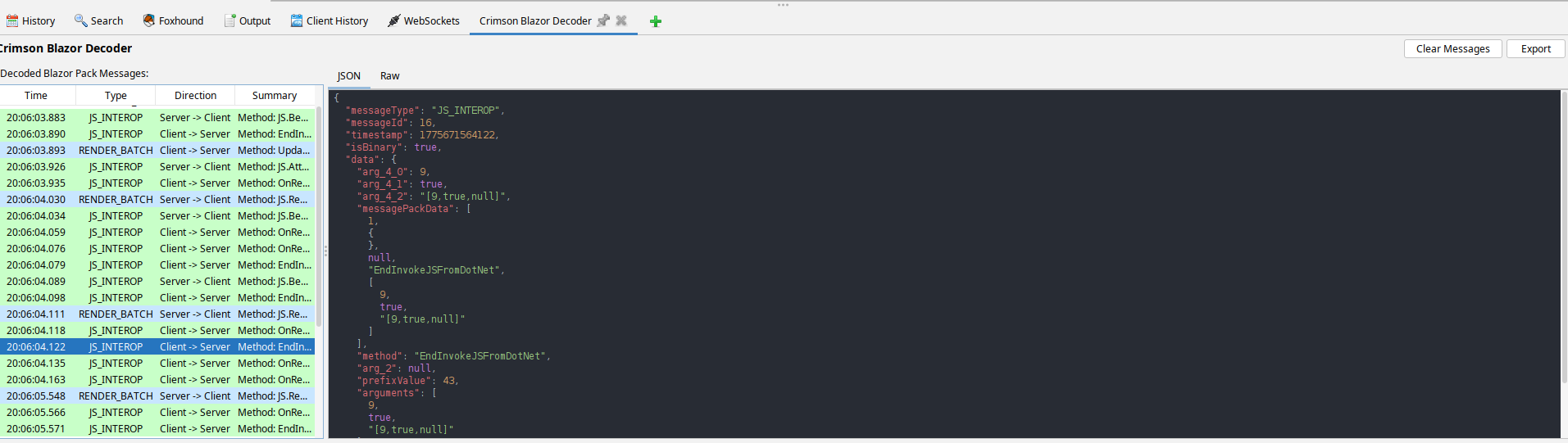
Crimson Blazor Decoder showing decoded Blazor Pack messages in ZAP
Messages sent by the client to the server can be intercepted, modified, and replayed, which is useful for testing how the server handles manipulated input and whether it enforces the validation constraints it is expected to enforce.
The engineering beneath the surface is worth noting. Thread safety in the regex configuration list uses synchronised access to prevent concurrent modification between the WebSocket observer thread and the Swing event dispatch thread, a category of defect that causes intermittent, hard-to-reproduce failures in real use. The encoder validates the input length to prevent out-of-memory errors with oversized payloads. The message table stores at most 10,000 entries, automatically dropping the oldest, and the JSON display truncates at 50,000 characters. These limits are not arbitrary constraints; they are decisions that keep the tool responsive and stable when it is pointed at an application generating high WebSocket traffic during a test.
Open Source, Apache Licence
The Crimson Blazor Decoder is published under the Apache Licence, Version 2.0. That licence allows anyone to use, modify, and redistribute the plugin.
The decision to release this publicly is also a statement about the nature of the problem itself. The difficulty of testing Blazor Server applications in ZAP is not unique to any one client or engagement. Every penetration tester working in ZAP who encounters a Blazor application faces the same obstacle: a channel that is captured but unreadable without a dedicated decoder. A decoder made available to the community raises testing quality across the board, which is a worthwhile outcome.
The source code is available for download, and contributions through pull requests are welcome.
Crimson Wall's work spans web applications, mobile applications, APIs, network infrastructure, enterprise resource planning systems, and AI-powered platforms. The Crimson Blazor Decoder is the first public tool from that work. Source code, pre-built releases, and documentation are available at https://github.com/crimsonwall/crimsonblazordecoder.